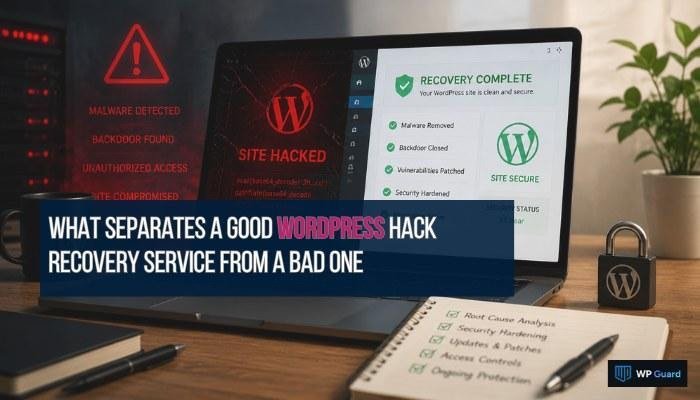
What Separates a Good WordPress Hack Recovery Service from a Bad One
A good WordPress hack recovery service finds the breach point, closes it, and hardens your site against the next attempt. A bad one removes the malware and stops there. That distinction determines your site’s odds of getting hit again.
If you’ve been through a hack, you already know how unsettling that can be. You want it gone for good, with proof it can’t happen the same way again. Too many recovery services, though, hand your site back the moment the malware scan comes back clean.
Having worked through enough recoveries at WP Guard, we know where that line is. What follows covers root cause analysis, post-hack hardening, and the red flags that expose a weak service.
The Gap Between a Surface Fix and a Real WordPress Hack Recovery Service
Surface fixes and real recoveries look identical on the outside. But truth be told, it’s like patching a hole in your roof with duct tape. The ceiling stops dripping, while the rot keeps spreading (and yes, some services stop there).
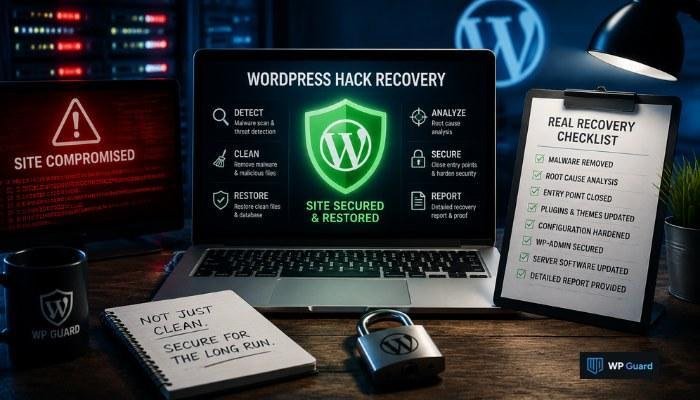
A real recovery closes three specific gaps that surface fixes consistently leave behind:
- The Entry Point: Deleting malware doesn’t close the weak configuration attackers used to get in. Think of it like changing your locks after a break-in, but leaving the broken window wide open. Your WordPress site stays exposed until someone finds and fixes the actual entry point.
- Outdated Plugins: Every unpatched plugin on your site gets flagged in automated vulnerability scans. A real recovery service runs a full plugin audit, updates everything to the latest version, and removes any plugin that hasn’t been maintained.
- No Post-Recovery Hardening: Malware removal and WordPress hardening are two separate steps. A surface fix stops at the first one. Meanwhile, a real recovery applies hardening across your configurations, file permissions, and access controls before signing off.
Put simply, your recovery report should mention the entry point and the hardening steps taken. If it doesn’t, the job isn’t finished.
Root Cause Analysis: The Step Cheap Services Skip
Cheap services skip root cause analysis because it’s the hardest part. The security configurations that failed the first time stay broken without it.
So what does a proper investigation look like? It breaks down into two steps:
1. The Detective Work Good Services Do
Good services treat a hack like a crime scene. They work through server logs, file changes, and access records to trace the exact attack vector back to its source.
In most cases we’ve worked through, the culprit wasn’t the malware itself. It was an outdated plugin or a compromised admin account. From there, a structured process for identifying application entry points produces documented evidence of what failed and why.
2. One Missed Entry Point Is All It Takes
When the original breach point goes unchecked, the second attack doesn’t need to be clever. Third-party software, outdated plugins, and weak security configurations all stay exposed.
And attackers already documented your site’s weak spot the first time they used it, so the second breach takes them a fraction of the time.
Common Mistakes That Expose a Weak Recovery Service
Three failures show up in almost every weak recovery: WP-admin left open, server software ignored, and no configuration audit after cleanup. If your service skipped any of those, the job isn’t done.
And all of those mistakes follow the same pattern:
- Unchecked Admin Access: WP-admin is the first thing attackers test after a breach, and weak services rarely secure it before handing your site back. Without login attempt limits, user account audits, or brute force protection, that same door stays wide open.
- Server Software Gets Left Behind: A surface cleanup doesn’t touch server software or unnecessary services, and attackers know it. Public vulnerability databases log those outdated versions the moment researchers discover a flaw. To make things worse, automated scanners match those listings against live sites every day.
- The Configuration Audit Nobody Runs: In a weak recovery, configuration management gets skipped entirely. Firewall rules, file permissions, and security settings drift back toward their default, insecure state within weeks of a recovery.
A report that skips these three details isn’t a full recovery report. WP-admin access controls, server software updates, and a configuration audit should all appear in writing before you accept the job as done.
System hardening is what covers all three properly.
System Hardening After Recovery Is Not Optional
Most people think recovery ends when the malware is gone. They’re wrong because a recovered site with no hardening still runs the same configuration gaps that made the attack possible.
A proper hardening process tackles locking down your configurations now and keeping them from slipping back later:
A System Hardening Checklist
Our team works through file permissions, WP-admin access controls, and firewall rules on every recovery before signing off. That checklist also covers user accounts, OS hardening (Operating System), and login attempt limits across every access point.
Next, every item gets checked against CIS benchmarks (Center for Internet Security), which establish specific, measurable standards for each configuration. Then, the team fixes any setting that fails before closing the job.
Hardening Requirements That Get Missed
Cheap services treat hardening as optional, which means server software goes weeks without updates and automatic updates never get configured after the cleanup. As a result, firewall rules and file permissions drift back to insecure defaults without active configuration management.
And two weeks later, your site runs the same security gaps it had before the hack.
What Incident Communication Reveals About a Recovery Team
Incident communication reveals the difference between a team that investigated deeply and one that just patched the surface.
You might have figured this out by now: good teams document every finding, including configuration changes, access points checked, and vulnerabilities closed. Those details in your report prove the team found the root cause and fixed it.
We’ve seen this firsthand. Recovery reports that list “malware removed” as the only finding (a one-line report is a receipt) tell you nothing about the attack vector, the root cause, or which configurations failed.
In fact, OWASP’s research on security logging and alerting failures confirms that poor documentation leaves sites exposed to the same attack twice. So if a team can’t show you what they found, they didn’t find much.
Good Recovery Doesn’t End When the Malware Is Gone
As you’ve learned by now, your site getting hacked once is already one time too many. Going through it again because the recovery wasn’t finished is unacceptable. You deserve better than that, and the right service knows it.
With that in mind, we walked through root cause analysis, system hardening, configuration management, and incident communication. A proper WordPress hack recovery service covers all four, every time, without exception.
WP Guard was built around that standard. Our team doesn’t hand your site back until the root cause is found, the configurations are locked, and the attack surface is closed. Your site comes back cleaner, harder, and properly documented.
Get in touch today.