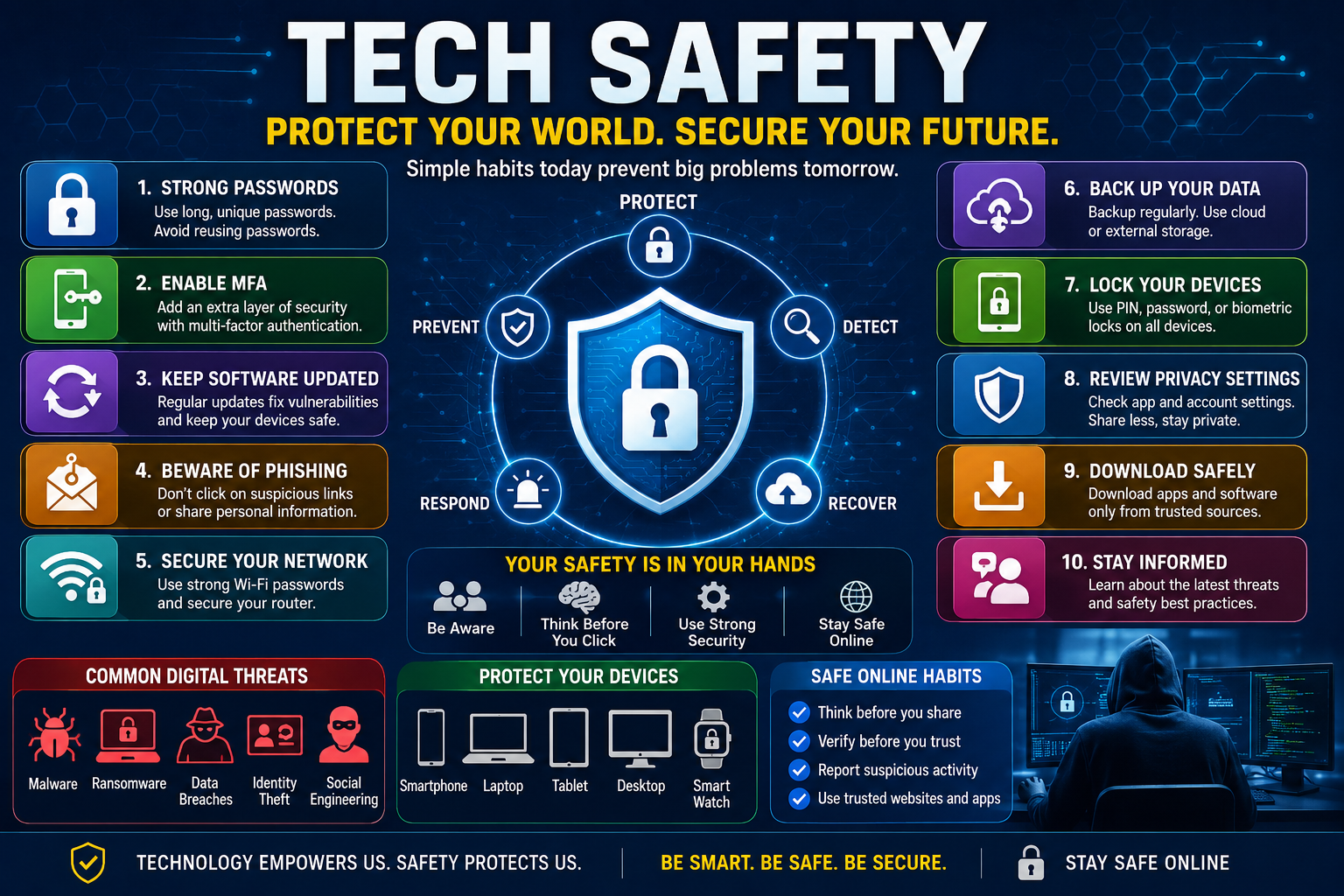
Tech Safety: The Ultimate Guide to Staying Safe in the Digital World
Tech safety means using technology in a way that reduces the risk of unauthorized access, fraud, data loss, privacy violations, malware, and other digital threats. It combines cybersecurity, privacy protection, safe online behavior, secure devices, strong authentication, and informed decision-making totallyndfw
What Is Tech Safety?
Tech safety is the broad practice of protecting people, devices, accounts, information, networks, and digital activities from avoidable harm.
It overlaps with several established areas of technology.
Cybersecurity
Cybersecurity focuses on protecting systems, networks, applications, and information against unauthorized access, attacks, disruption, and misuse.
Digital Privacy
Digital privacy concerns how personal information is collected, stored, shared, analyzed, and used.
Internet Safety
Internet safety focuses on safer behavior while browsing websites, communicating online, downloading files, shopping, using social networks, and participating in online communities.
Device Security
Device security involves protecting smartphones, computers, tablets, routers, smart-home products, and other connected equipment.
Data Protection
Data protection focuses on preventing sensitive information from being lost, exposed, altered, or accessed by unauthorized people.
Tech safety combines these areas into a practical everyday framework.
Why Tech Safety Matters More Than Ever
The modern digital environment is highly interconnected.
A single compromised account can sometimes become the starting point for additional problems.
For example, imagine that someone gains access to an individual’s email account.
The attacker may discover:
- Password-reset messages
- Shopping accounts
- Personal conversations
- Travel information
- Financial notifications
- Business communications
- Cloud-storage links
- Contact information
The email account can therefore become a digital master key.
This is why protecting individual accounts matters even when the account itself does not contain valuable information.
The Six Layers of Tech Safety
A useful way to understand technology safety is to divide it into six layers.
Layer One: Identity
Protect your digital identity through strong authentication, unique passwords, and account recovery controls.
Layer Two: Devices
Keep smartphones, computers, tablets, and other devices updated and protected.
Layer Three: Data
Protect sensitive files using encryption, access controls, secure storage, and backups.
Layer Four: Network
Use trusted networks, secure Wi-Fi settings, and appropriate protections when connecting remotely.
Layer Five: Behavior
Recognize scams, suspicious messages, malicious links, impersonation attempts, and social-engineering tactics.
Layer Six: Recovery
Assume that something can eventually go wrong and prepare a recovery strategy before an incident happens.
This final layer is often overlooked.
A person may have excellent passwords but still suffer major damage if their phone is lost and they have no backup authentication method.
The Most Common Tech Safety Threats
Technology threats constantly evolve, but many attacks still depend on basic human mistakes.
Phishing
Phishing involves deceptive messages designed to persuade people to reveal information, open malicious content, transfer money, or perform an unsafe action.
A phishing message may appear to come from:
- A bank
- Employer
- Delivery company
- Government department
- School
- Friend
- Relative
- Social-media platform
- Technology company
The message may create urgency.
Examples include:
“Your account will be closed today.”
“Your payment failed.”
“Verify your identity immediately.”
“Your package could not be delivered.”
The goal is to make the victim act before thinking.
Smishing
Smishing is phishing delivered through SMS or similar messaging systems.
Text messages can feel more personal than emails, which makes them effective for social engineering.
Vishing
Vishing uses voice calls to manipulate victims.
A caller may pretend to be:
- Bank staff
- Technical support
- Police
- Government officials
- Delivery staff
- Company representatives
Caller-ID information should not automatically be treated as proof of identity.
Malware
Malware is malicious software designed to disrupt systems, steal information, spy on users, damage files, or perform unauthorized activities.
Common categories include:
- Viruses
- Trojans
- Spyware
- Ransomware
- Worms
- Keyloggers
- Information stealers
Ransomware
Ransomware can prevent users or organizations from accessing files or systems and may demand payment.
The best defense is not simply hoping that ransomware never arrives.
A strong backup strategy can dramatically improve recovery options.
Account Takeover
Account takeover occurs when an unauthorized person gains control of an account.
Weak or reused passwords can increase risk.
Once attackers gain access to one account, they may attempt to compromise additional accounts.
Identity Theft
Identity theft occurs when personal information is misused to impersonate someone or commit fraud.
Information can include:
- Name
- Address
- Identification information
- Account credentials
- Financial information
- Contact information
Social Engineering
Social engineering attacks target human decision-making rather than technical vulnerabilities.
An attacker may manipulate emotions such as:
- Fear
- Urgency
- Curiosity
- Trust
- Greed
- Sympathy
This is one reason tech safety is partly a behavioral discipline.
Password Safety
Passwords remain one of the most important parts of everyday digital security.
However, the goal should not be to create dozens of complicated passwords and memorize all of them.
A better strategy is to use a reputable password manager.
What Makes a Password Strong?
A strong password should generally be:
- Long
- Unique
- Difficult to guess
- Not based on obvious personal information
- Not reused across important accounts
A password used for email should not also be used for banking, shopping, and social media.
Why Password Reuse Is Dangerous
Suppose the password for an online shopping account becomes exposed.
If the same password is used for email, an attacker may attempt the same credentials there.
This is known as credential stuffing.
One compromised service can therefore create risks elsewhere.
Password Managers
A password manager can generate and store unique credentials.
This changes the problem from:
“How do I remember 40 passwords?”
to:
“How do I protect one master credential?”
That is usually a much more manageable security problem.
Multi-Factor Authentication
Multi-factor authentication, commonly called MFA, adds another verification layer.
Instead of relying only on:
Something you know
such as a password, MFA can add:
Something you have
such as a security key or authentication device.
It can also use:
Something you are
such as biometric verification.
Why MFA Matters
If someone obtains your password, MFA may still prevent them from accessing the account.
It is not perfect protection, but it creates another barrier.
For important accounts, prioritize MFA for:
- Banking
- Cloud storage
- Business systems
- Password managers
- Social-media accounts
- Cryptocurrency accounts
Authentication Apps and Security Keys
Not all authentication methods offer the same level of protection.
Where supported, authentication applications and hardware security keys can provide stronger protection than basic SMS-based verification.
Security keys are especially valuable for high-risk accounts.
However, convenience also matters.
A security system that users cannot operate correctly may create its own problems.
The best solution is one that provides strong protection while remaining practical.
Smartphone Tech Safety
Smartphones are among the most important personal computing devices.
They contain:
- Photos
- Messages
- Contacts
- Emails
- Banking applications
- Authentication tools
- Social-media accounts
- Location information
- Documents
Use a Strong Screen Lock
Use a secure passcode or another strong device-locking method.
Avoid easily guessed patterns or codes.
Keep the Operating System Updated
Updates frequently include security improvements.
Delaying updates indefinitely can leave known weaknesses unaddressed.
Review App Permissions
An application may request access to:
- Camera
- Microphone
- Contacts
- Location
- Photos
- Files
Ask whether the permission is genuinely necessary.
A flashlight application does not normally need access to your contacts.
Install Apps Carefully
Download applications from trusted sources and pay attention to:
- Developer identity
- Reviews
- Permissions
- Number of downloads
- Update history
Avoid downloading unknown applications simply because a random website tells you to.
Computer Safety
Computers remain essential for work, education, creativity, and business.
Keep Software Updated
Update:
- Operating systems
- Browsers
- Office software
- Security tools
- Drivers where appropriate
- Frequently used applications
Use Security Software
Modern operating systems often include built-in security capabilities.
For many users, properly configured built-in protections combined with safe behavior provide a solid baseline.
Additional security software may be appropriate for particular users or organizations.
Lock Your Computer
A computer left unlocked in a workplace, school, hotel, or public environment can expose sensitive information.
Use automatic screen locking whenever possible.
Wi-Fi and Network Safety
Home Wi-Fi is the foundation of many connected devices.
A weak wireless network can create unnecessary risk.
Secure the Router
Change default administrative credentials.
Keep router firmware updated when updates are available.
Use modern wireless security standards supported by your equipment.
Create a Guest Network
If supported, a guest network can separate visitors from some of your primary devices.
This is particularly useful when you have:
- Smart TVs
- Smart speakers
- Cameras
- IoT devices
- Home automation products
Avoid Untrusted Networks for Sensitive Activity
Public Wi-Fi can be convenient, but users should be cautious when accessing sensitive services.
When possible, use trusted networks or appropriate secure connections.
Public Wi-Fi Safety
Public networks exist in:
- Airports
- Hotels
- Restaurants
- Cafes
- Shopping centers
- Universities
- Libraries
The safest approach is to assume that a public network is not your private home network.
Avoid automatically connecting to unknown networks.
Disable automatic connection features where appropriate.
Cloud Security
Cloud storage is convenient, but cloud accounts require strong security.
Services such as online storage, document platforms, and collaboration tools can contain valuable information.
Secure Cloud Accounts
Use:
- Unique passwords
- MFA
- Recovery methods
- Device-management features
- Access reviews
Check Shared Files
A file accidentally shared publicly can expose information without any malware being involved.
Review sharing permissions periodically.
Ask:
Who can access this file?
and
Do they still need access?
Backup Strategy
Backups are one of the most underrated parts of tech safety.
A backup can help recover from:
- Hardware failure
- Accidental deletion
- Theft
- Malware
- Ransomware
- Lost devices
- Software problems
The Three-Copy Principle
A practical strategy is to maintain multiple copies of important data.
For example:
- Original data
- Local backup
- Separate backup
The exact architecture depends on your needs.
Test Your Backups
A backup that cannot be restored is not a reliable backup.
Periodically test whether files can actually be recovered.
Tech Safety for Families
Children increasingly use connected devices for school, entertainment, communication, and social interaction.
Technology safety should therefore be taught rather than simply enforced.
Teach Children About Personal Information
Children should understand that information such as:
- Full name
- Home address
- School details
- Passwords
- Phone number
- Private photographs
should not automatically be shared online.
Explain Online Strangers
A person online may not be who they claim to be.
Children should know how to respond if someone asks for:
- Private photographs
- Personal information
- Secret conversations
- Money
- In-person meetings
Create a Safe Reporting Culture
Children should feel comfortable telling parents or trusted adults when something uncomfortable happens online.
Fear of punishment can discourage reporting.
A better message is:
“If something goes wrong, tell me first. We will solve it together.”
Tech Safety for Seniors
Older adults can be attractive targets for certain types of scams because criminals may exploit unfamiliarity with technology.
Common scams include:
- Fake technical support
- Banking impersonation
- Government impersonation
- Investment fraud
- Romance scams
- Prize scams
- Delivery scams
A Simple Rule for Seniors
If someone unexpectedly demands immediate payment or asks for passwords, stop and verify.
Do not let urgency eliminate careful thinking.
Tech Safety for Students
Students use technology for education, social interaction, employment, and entertainment.
They should learn:
- Password management
- MFA
- Phishing recognition
- Privacy settings
- Safe downloads
- Cloud security
- Responsible social-media behavior
Students should also understand that digital footprints can last for years.
Tech Safety for Remote Workers
Remote work creates unique security challenges.
Employees may work from:
- Home
- Cafes
- Hotels
- Airports
- Coworking spaces
Separate Work and Personal Accounts
Where possible, keep business and personal activities separated.
Protect Work Devices
Use:
- Device encryption
- Screen locks
- Security updates
- Company-approved software
- Secure authentication
Be Careful With Sensitive Conversations
Public places are not ideal for discussing confidential company information.
Tech Safety for Businesses
Businesses face more complex technology risks because they manage information belonging to employees, customers, suppliers, and partners.
A business security program should address:
- Identity
- Devices
- Networks
- Data
- Employees
- Vendors
- Backups
- Incident response
Employee Training
Employees are part of the security system.
Training should cover:
- Phishing
- Passwords
- MFA
- Data handling
- Social engineering
- Reporting incidents
Least Privilege
Employees should receive only the access they need to perform their jobs.
This can limit damage if an account becomes compromised.
Tech Safety and Artificial Intelligence
Artificial intelligence introduces both opportunities and risks.
AI can improve security by helping identify unusual activity, analyze large datasets, detect threats, and automate certain defensive tasks.
At the same time, criminals can use AI to create more convincing:
- Phishing messages
- Fake profiles
- Social-engineering scripts
- Voice impersonation
- Synthetic media
The New Verification Problem
As synthetic content becomes more convincing, people cannot rely exclusively on appearance or writing style.
Verification becomes increasingly important.
If a message requests money, sensitive information, or an unusual action, verify it through an independent channel.
Deepfakes and Digital Trust
Deepfake technology can produce convincing manipulated audio, images, and video.
The important lesson is not that every video is fake.
The lesson is:
Authenticity should not be assumed simply because something looks convincing.
For high-value decisions, verify the source.
Tech Safety and Smart Homes
Smart homes can include:
- Cameras
- Doorbells
- Smart locks
- Thermostats
- Speakers
- Lighting systems
- Appliances
These devices can improve convenience, but internet-connected equipment creates additional attack surfaces.
Secure Smart Devices
Change default credentials.
Update firmware.
Disable unnecessary features.
Review cloud accounts.
Remove devices you no longer use.
Tech Safety for Wearables
Smartwatches and fitness devices can collect information such as:
- Activity
- Location
- Health-related measurements
- Sleep information
- Personal preferences
Users should review:
- Data-sharing settings
- App permissions
- Account security
- Location access
Tech Safety While Traveling
Travel creates additional risks because people frequently use unfamiliar networks and devices.
Before Traveling
Prepare:
- Device updates
- Backups
- MFA
- Recovery codes
- Secure passwords
- Minimal sensitive data
At Hotels
Avoid leaving valuable devices unattended.
Use device locks.
Be careful with public charging stations and unknown accessories.
After Returning Home
Review accounts for unusual activity.
Update passwords if you suspect exposure.
USB and Charging Safety
Unknown USB devices can pose security risks.
Do not connect unfamiliar USB drives to important computers.
For public charging, use trusted charging equipment and appropriate protective measures rather than connecting sensitive devices to unknown data connections.
Browser Safety
Your web browser is one of your most frequently used applications.
Keep It Updated
Browser security changes rapidly.
Be Careful With Extensions
Browser extensions can have broad access to websites and browsing information.
Install only extensions you genuinely need.
Review them periodically.
Watch for Fake Websites
A website may visually imitate a legitimate service.
Before entering sensitive information, confirm the address and context.
Social Media Safety
Social media creates unique privacy challenges.
Avoid publicly exposing information that could help attackers guess:
- Password-reset questions
- Personal routines
- Security answers
- Travel plans
- Family details
Review Old Posts
Information shared years ago may remain publicly accessible.
Review privacy settings and older content periodically.
Online Shopping Safety
Before buying online, evaluate:
- Website legitimacy
- Payment security
- Seller identity
- Return policy
- Contact information
- Reviews
- Unusually low prices
A dramatic discount can sometimes be a warning sign rather than a bargain.
Online Banking Safety
Banking accounts require especially strong security.
Use:
- Unique credentials
- MFA
- Device locks
- Banking notifications
- Official applications
- Secure networks
Never provide banking credentials to someone who contacts you unexpectedly.
Cryptocurrency Safety
Cryptocurrency introduces additional security responsibilities.
Depending on the system used, losing access credentials can result in permanent loss.
Users should understand:
- Wallet security
- Recovery phrases
- Hardware wallets
- Phishing
- Fake investment opportunities
- Transaction verification
Never share a private key or recovery phrase with anyone.
Ten Major Technology Brands and Their Safety Focus
The following table compares major technology brands according to the types of technology safety features commonly associated with their ecosystems. Features and availability can change by product, plan, region, and account type.
| Brand | Main Technology Area | Key Safety Focus | Best For |
|---|---|---|---|
| Apple | Devices & ecosystem | Device security, privacy, account protection | Consumer privacy and integrated devices |
| Search, Android & cloud | Account security, spam protection, device security | Google ecosystem users | |
| Microsoft | Windows & business technology | Endpoint, identity and enterprise security | Businesses and professionals |
| Samsung | Smartphones & electronics | Mobile security and device protection | Android users |
| Amazon | Cloud & smart home | Account, cloud and connected-device security | Consumers and businesses |
| Cisco | Networking & enterprise | Network and cybersecurity | Organizations |
| Cloudflare | Internet infrastructure | Network, application and web protection | Websites and businesses |
| CrowdStrike | Cybersecurity | Endpoint and threat detection | Businesses |
| Palo Alto Networks | Cybersecurity | Network and cloud security | Enterprises |
| Norton | Consumer security | Device and identity protection | Individual consumers |
These brands should not be viewed as interchangeable.
A smartphone manufacturer, cloud provider, network-security company, and consumer-security company solve different problems.
How to Choose Technology Safety Tools
Do not start with the question:
“What is the best security software?”
Start with:
“What risk am I trying to reduce?”
For example:
| Problem | Appropriate Focus |
|---|---|
| Weak passwords | Password manager |
| Account takeover | MFA |
| Data loss | Backup |
| Malware | Security software and safe behavior |
| Phishing | User awareness and email protections |
| Lost phone | Device lock and remote-management tools |
| Business data exposure | Access control and security policies |
| Network attacks | Secure router and network controls |
| Privacy concerns | Permission and privacy management |
| Child online safety | Parental controls and education |
Pros of Strong Tech Safety
Reduced Risk
Good security practices reduce opportunities for attackers.
Better Privacy
Privacy controls can limit unnecessary data exposure.
Greater Resilience
Backups and recovery systems help people recover from incidents.
Increased Confidence
People can use technology more comfortably when they understand how to protect themselves.
Business Continuity
For organizations, effective security can reduce disruption.
Cons and Limitations of Tech Safety
Convenience Trade-Offs
Additional security steps can sometimes require more effort.
Cost
Some advanced security tools require subscriptions or specialized hardware.
Complexity
Too many settings can confuse users.
False Sense of Security
No system is perfectly secure.
A security application cannot compensate for careless behavior in every situation.
Maintenance
Security requires ongoing attention.
Common Tech Safety Mistakes
Using One Password Everywhere
This creates a domino effect.
Ignoring Updates
Old software may contain known weaknesses.
Clicking Under Pressure
Urgency is a common social-engineering tactic.
Oversharing Online
Personal information can help attackers construct convincing scams.
No Backups
A device failure can become a disaster when important data exists in only one place.
Trusting Caller ID
Caller ID should not be treated as definitive proof of identity.
Installing Too Many Apps
Every application can introduce additional permissions and potential vulnerabilities.
Forgetting Recovery Options
Strong security can become inconvenient if you lose access to your own account.
A Practical Tech Safety Routine
Tech safety does not have to consume hours every week.
Daily
- Think before clicking
- Lock your devices
- Avoid suspicious messages
- Watch for unusual account notifications
Weekly
- Review important account activity
- Check for unexpected login alerts
- Back up important information where necessary
Monthly
- Review applications
- Remove unused accounts
- Check privacy permissions
- Update important devices
Every Few Months
- Review passwords
- Test backups
- Review account recovery methods
- Check connected devices
- Review social-media privacy
The Tech Safety Checklist
Use this simple checklist:
- Use unique passwords.
- Enable MFA on important accounts.
- Keep operating systems updated.
- Update applications.
- Lock devices.
- Back up important files.
- Review app permissions.
- Secure home Wi-Fi.
- Avoid suspicious links.
- Verify unexpected requests.
- Be careful with public networks.
- Remove unused applications.
- Monitor financial and account notifications.
- Prepare recovery methods.
- Teach family members about scams.
What to Do If You Suspect an Account Has Been Compromised
Do not panic.
Act systematically.
Step One: Secure the Account
Change the password using a trusted device.
Step Two: Enable MFA
If it was not already enabled, activate it.
Step Three: Review Sessions
Check where the account is signed in and remove unknown devices.
Step Four: Check Recovery Information
Look for unauthorized changes to:
- Phone number
- Recovery address
Step Five: Check Related Accounts
If the compromised password was reused elsewhere, change those passwords immediately.
Step Six: Monitor for Further Activity
Watch for:
- Unexpected messages
- Password resets
- Financial activity
- New devices
- Unusual login alerts
What to Do After Losing a Smartphone
A lost smartphone can create serious risks because it may contain authentication credentials and personal information.
Use available remote-management capabilities to:
- Locate the device
- Lock it
- Display a contact message
- Remove access
- Erase data when appropriate
Contact your mobile provider if necessary.
Change important account credentials if you believe the device may have been accessed.
Tech Safety and Human Psychology
One of the most important insights about digital security is that technology alone cannot solve the problem.
Attackers frequently exploit predictable human behavior.
People naturally respond to:
- Urgency
- Authority
- Fear
- Familiarity
- Rewards
A scam saying:
“You have 10 minutes to prevent account closure”
can be more effective than a technically sophisticated attack because it encourages rushed decision-making.
The strongest defense is therefore not just software.
It is calm verification.
The Two-Minute Verification Rule
Before performing an unusual digital action, pause for two minutes.
Ask:
- Who is requesting this?
- Why are they requesting it?
- Was I expecting this message?
- Is the request urgent?
- Can I verify it independently?
Two minutes of caution can prevent hours, days, or even months of damage.
Future Trends in Tech Safety
Technology safety will continue to change as technology itself evolves.
Passwordless Authentication
Passkeys and other passwordless approaches are increasingly important because they can reduce dependence on traditional passwords.
AI-Powered Security
Security systems will increasingly use machine learning and artificial intelligence to identify unusual activity.
AI-Powered Scams
At the same time, criminals can use AI to create more convincing attacks.
This creates an ongoing technological competition.
Zero-Trust Security
Organizations increasingly focus on verifying users, devices, and access requests rather than automatically trusting people because they are inside a network.
Privacy-Preserving Technology
As data collection increases, privacy-preserving technologies are likely to become more important.
Connected-Device Security
The number of connected devices continues to grow, increasing the importance of securing IoT products.
Digital Identity
Identity verification will become increasingly important as online services become more sophisticated.
The Biggest Future Tech Safety Challenge
The biggest future challenge may not be malware.
It may be trust.
As AI-generated content becomes increasingly convincing, users will have to decide:
- Is this message genuine?
- Is this voice authentic?
- Is this photograph real?
- Is this website legitimate?
- Is this person actually who they claim to be?
Technology safety will therefore increasingly involve verification skills.
A New Definition of Digital Literacy
Digital literacy once meant knowing how to use a computer.
Today it means much more.
A digitally literate person should understand:
- Privacy
- Security
- Algorithms
- Scams
- AI-generated content
- Data collection
- Authentication
- Digital identity
- Online reputation
In the future, these skills may be as fundamental as reading and writing.
Tech Safety for Different Demographics
Tech Safety for Children
Focus on:
- Privacy
- Stranger awareness
- Safe communication
- Parental controls
- Reporting problems
Tech Safety for Teenagers
Focus on:
- Social media
- Digital reputation
- Phishing
- Account security
- Privacy
Tech Safety for Adults
Focus on:
- Financial security
- Identity protection
- Passwords
- Work devices
- Online shopping
Tech Safety for Seniors
Focus on:
- Scam recognition
- Impersonation
- Banking safety
- Technical-support fraud
- Simple security routines
Tech Safety for Professionals
Focus on:
- Business data
- MFA
- Endpoint security
- Access controls
- Secure collaboration
Tech Safety for Small Businesses
Focus on:
- Employee training
- Backups
- Business email
- Access management
- Incident response
Internal Linking Opportunities
For a website building a broader technology information hub, this article can naturally connect with related content such as:
Cybersecurity for Beginners
Explain the fundamentals of protecting devices, accounts, and networks.
How to Create Strong Passwords
Provide a deeper guide to password managers, unique credentials, and authentication.
What Is Two-Factor Authentication?
Explain MFA and why it protects accounts.
How to Recognize Phishing Emails
Create a practical visual guide to suspicious messages.
Best Privacy Settings for Smartphones
Explain permission management and privacy controls.
Cloud Storage Security Guide
Cover safe file sharing, account security, and backups.
Online Safety for Children
Provide a family-focused guide to responsible technology use.
AI Safety Guide
Discuss privacy, misinformation, deepfakes, and responsible AI use.
FAQs
What does tech safety mean?
Tech safety means using technology securely and responsibly while protecting devices, accounts, personal information, privacy, and digital identity from avoidable risks.
Why is tech safety important?
Technology stores and processes increasingly valuable information. Strong tech safety reduces the likelihood and potential impact of unauthorized access, scams, malware, data loss, and privacy problems.
What is the most important tech safety practice?
There is no single solution, but using unique passwords with multi-factor authentication on important accounts is one of the strongest basic practices.
Is antivirus software enough for tech safety?
No. Security software can provide useful protection, but it cannot replace secure passwords, MFA, updates, backups, privacy controls, and careful online behavior.
How can I protect my smartphone?
Use a strong screen lock, keep the operating system updated, install applications carefully, review permissions, enable account security features, and maintain backups of important information.
How can I protect my computer?
Keep the operating system and applications updated, use built-in or appropriate security protections, lock the device when unattended, use strong authentication, and maintain reliable backups.
What should I do if I receive a suspicious message?
Do not click links or provide sensitive information immediately. Verify the request through an independent method, such as opening the official application yourself or contacting the organization using a trusted contact method.
Is public Wi-Fi safe?
Public Wi-Fi can be used, but it should be treated as less trusted than your private network. Avoid unnecessary sensitive activity and use appropriate secure connections.
What is the difference between cybersecurity and tech safety?
Cybersecurity is a broad field focused on protecting digital systems, networks, and information. Tech safety is a more accessible everyday concept that includes cybersecurity, privacy, safe behavior, device protection, and recovery practices.
How often should I change my passwords?
Rather than changing every password on a fixed schedule without reason, focus on using unique credentials, MFA, and changing passwords when there is evidence of compromise or when security guidance for a particular service recommends it.
Are smart-home devices safe?
Smart-home devices can be reasonably secure when properly configured, but they should be updated, protected with strong credentials, and reviewed for unnecessary features and permissions.
Can artificial intelligence make technology safer?
Yes. AI can help identify suspicious behavior and analyze large amounts of security data. However, AI can also be used by criminals, so it creates both defensive opportunities and new risks.
How can families improve tech safety?
Families should combine technical controls with education. Use strong authentication, privacy settings, updates, backups, and parental controls while teaching children how to recognize suspicious behavior.
What is the best way to protect important files?
Maintain reliable backups and protect the accounts and devices that provide access to those backups. Test the restoration process periodically.
Can tech safety guarantee complete protection?
No. There is no perfect security system. The objective is to reduce risk, detect problems quickly, and maintain the ability to recover when something goes wrong.
Conclusion
Tech safety is no longer a specialist concern reserved for cybersecurity professionals. It is an everyday digital skill that affects anyone who uses a smartphone, computer, online account, smart device, cloud service, banking application, or social network. The most effective approach is not to fear technology but to understand how it works, recognize common risks, and build simple protective habits into everyday life.