eSIM for International Travel: Easy Guide to Global Connectivity
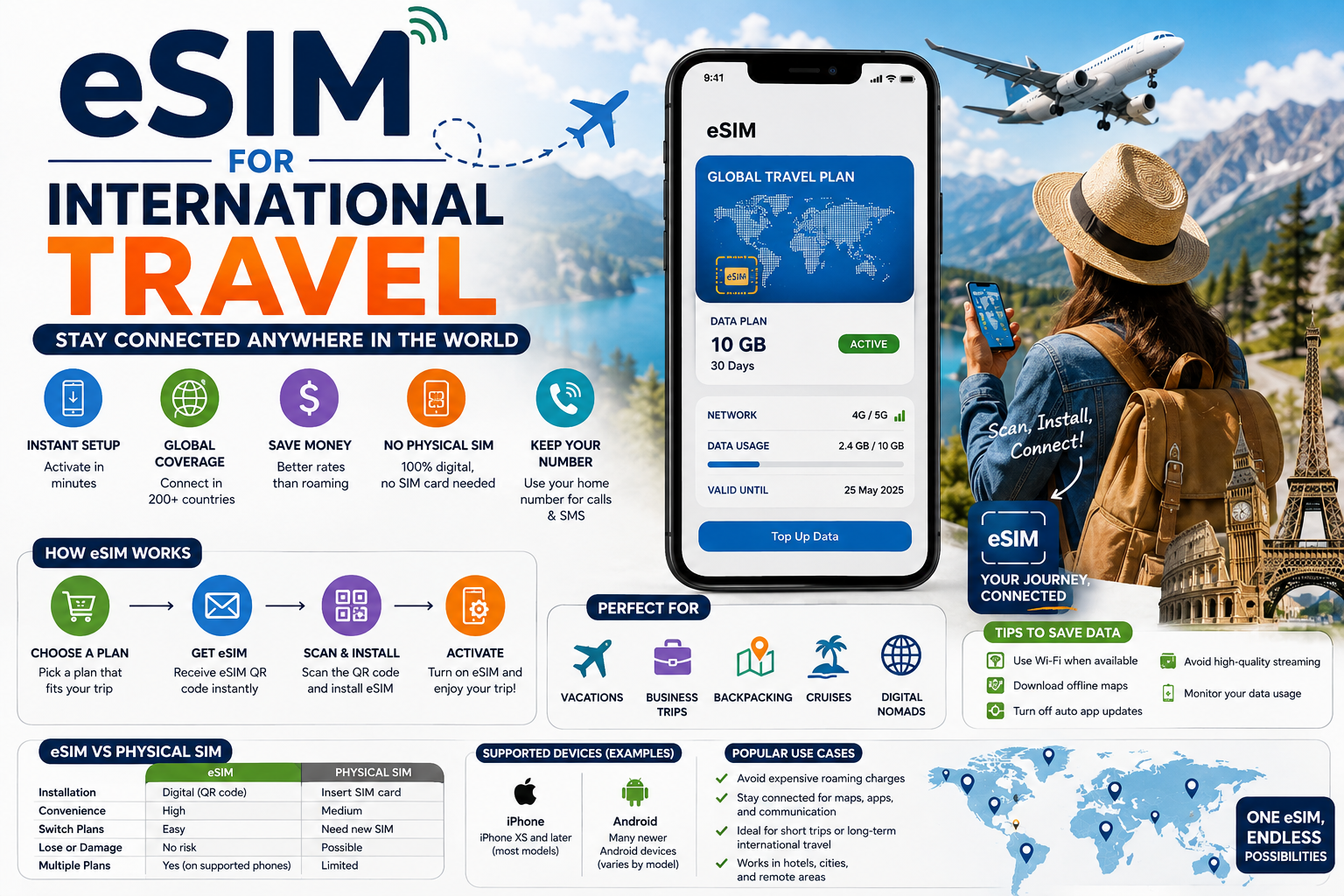
Traveling to another country is exciting, but staying connected can sometimes be difficult. Your regular mobile plan may have limited international coverage, roaming can be expensive, and buying a physical SIM card in another country can take time. This is where an eSIM for international travel can be a useful option. An eSIM is a digital SIM built into a compatible smartphone, tablet, or other device. Instead of inserting a small plastic SIM card, you can download a mobile plan directly to your device. This makes it possible to prepare your phone before a trip and connect to a supported network after reaching your destination travelsfornow.com
What Is an eSIM for International Travel?
An eSIM is an electronic SIM that is built into a device. The name means “embedded SIM.” Unlike a traditional SIM card, it does not need to be physically removed or inserted.
An eSIM for international travel is a digital mobile plan designed to provide connectivity outside your home country.
Depending on the provider and plan, an international eSIM may offer:
- Mobile data
- Local network access
- Calls
- Text messages
- 4G connectivity
- 5G connectivity
- Regional coverage
- Multi-country coverage
- Hotspot or tethering
Many travel eSIMs are data-only. This means they provide internet access but do not give you a normal phone number for traditional calls and SMS. You can still use internet-based services such as WhatsApp, Messenger, FaceTime, Skype, and other communication apps when supported.
Other eSIM plans may include a phone number and traditional voice and text services.
How an eSIM Works
An eSIM works in much the same basic way as a physical SIM. It tells your phone which mobile network and service plan to use.
The major difference is how the plan is installed.
With a physical SIM:
- You buy a SIM card.
- You remove your current SIM.
- You insert the new card.
- Your phone connects to the new network.
With an eSIM:
- You buy a digital plan.
- You receive activation information.
- You install the eSIM on your compatible device.
- You select the eSIM for mobile data.
- Your phone connects to the supported network.
This digital process can make international travel easier.
eSIM vs Physical SIM for International Travel
Both eSIMs and physical SIM cards can provide mobile service abroad. The best option depends on your device, destination, and travel needs.
| Feature | eSIM | Physical SIM |
|---|---|---|
| Physical card | Not required | Required |
| Installation | Digital | Insert card |
| Setup | Usually through QR code or app | Insert and activate |
| Easy to switch plans | Yes | Requires changing cards |
| Risk of losing SIM | Very low | Possible |
| Multiple plans | Often supported | Depends on device |
| Local phone number | Depends on plan | Often available |
| Best for | Flexible travel | Traditional local service |
An eSIM is often more convenient because you do not have to carry a tiny SIM card or find a store after arriving.
Why Use an eSIM for International Travel?
There are many reasons travelers choose an eSIM.
Easy Digital Setup
You can often purchase and install an eSIM before leaving home. This means you do not need to find a mobile store immediately after landing.
You can prepare the service while connected to your home Wi-Fi and activate it according to the provider’s instructions.
No Physical SIM Card
There is no small plastic card to remove, store, or lose.
This is especially helpful when traveling through several countries.
Keep Your Main SIM
Many modern smartphones support dual-SIM features. This can allow you to keep your normal SIM while adding a travel eSIM.
For example:
- Your regular SIM can remain available for your normal number.
- The travel eSIM can provide mobile data.
- You can choose which line handles mobile data.
- You can switch between lines when necessary.
The exact options depend on your phone and carrier.
Flexible Travel Plans
Travel eSIM providers may offer plans based on:
- One country
- Several countries
- One region
- Multiple regions
- A fixed number of days
- A specific amount of data
- Unlimited data under certain terms
This gives travelers more choices.
Useful for Multi-Country Trips
A regional eSIM can be convenient if you are visiting several countries.
For example, a traveler visiting France, Germany, Italy, and Spain may prefer a European regional eSIM instead of buying separate SIM cards.
Types of eSIM for International Travel
Not all eSIM plans are the same. Understanding the different types can help you choose the right option.
Country-Specific eSIM
A country-specific eSIM is designed for one country.
This can be useful if you are spending your entire trip in one destination.
For example, someone visiting Japan for two weeks may choose a Japan-specific eSIM.
Advantages can include:
- Simple plan selection
- Destination-focused coverage
- Suitable for single-country trips
- Easy data management
Regional eSIM
A regional eSIM covers several countries in a specific area.
Common regional plans may cover destinations across:
- Europe
- Asia
- North America
- Latin America
- The Middle East
- Africa
Regional plans can be useful when crossing borders.
Global eSIM
A global eSIM is designed for travelers who visit many parts of the world.
It can be useful for:
- Frequent travelers
- Digital nomads
- International business travelers
- Long multi-country journeys
Global plans can cost more, but the convenience may be valuable for people who travel often.
Data-Only eSIM
Many travel eSIMs are data-only.
You can use the internet for:
- Messenger
- FaceTime
- Maps
- Social media
- Online booking
- Translation
- Video calls
However, a data-only eSIM may not provide traditional phone calls or SMS.
eSIM With Calls and Texts
Some plans provide voice and SMS services.
These can be useful when you need:
- A local number
- Traditional calls
- Standard text messages
- Business communication
Always check exactly what is included before buying.
How to Choose the Best eSIM for International Travel
Choosing an eSIM is not just about finding the cheapest package.
You should compare several important features.
Check Destination Coverage
First, make sure your destination is included.
If you are visiting several countries, check every country.
Do not assume that a plan advertised as “Europe” or “Asia” automatically includes every country in that region.
Check Network Partners
An eSIM provider usually works with local mobile networks.
Network partners affect:
- Coverage
- Speed
- Reliability
- 4G availability
- 5G availability
A cheaper plan may not be useful if it has poor coverage in the places you plan to visit.
Choose the Right Data Amount
Think about how you normally use your phone.
A light traveler may need only:
- Messaging
- Maps
- Weather information
A heavy user may need:
- Video streaming
- Social media
- Video calls
- Hotspot
- Cloud storage
- Online gaming
Choose a plan based on your actual usage.
Check Plan Duration
Travel eSIM plans can have different validity periods.
Common options may include:
- 1 day
- 3 days
- 7 days
- 15 days
- 30 days
- 60 days
- 90 days
A seven-day plan may not be suitable for a 30-day trip.
Check Hotspot Support
If you plan to share your mobile data with a laptop or tablet, check whether hotspot or tethering is allowed.
Not every eSIM plan supports hotspot use.
Check Customer Support
Good customer support is important when traveling.
If your eSIM stops working in another country, you may need help quickly.
Look for information about:
- Live support
- Email support
- Chat support
- Installation help
- Refund rules
- Activation problems
How Much Data Do You Need?
Data needs vary from traveler to traveler.
| Activity | Typical Data Use |
|---|---|
| Text messaging | Low |
| Low | |
| Maps | Low to moderate |
| Web browsing | Low to moderate |
| Social media | Moderate |
| Music streaming | Moderate |
| Video calls | Moderate to high |
| Video streaming | High |
| Hotspot use | High |
| Large downloads | Very high |
If you mostly use maps and messaging, a small plan may be enough.
If you stream videos every day, you may need a much larger plan.
Light Data User
A light user may mainly use:
- Google Maps
- Online translation
- Weather apps
Such travelers may not need a large data package.
Moderate Data User
A moderate user may also use:
- Music
- Video calls
- Frequent browsing
A medium-sized package may be more suitable.
Heavy Data User
Heavy users may use:
- Netflix
- YouTube
- TikTok
- Video meetings
- Hotspot
- Cloud backups
These activities can consume large amounts of data.
How to Install an eSIM for International Travel
Installing an eSIM is usually straightforward, but the exact steps depend on your device and provider.
Install With a QR Code
A common method is QR activation.
The general process is:
- Purchase an eSIM plan.
- Receive the QR code.
- Connect your phone to Wi-Fi.
- Open mobile or cellular settings.
- Choose the option to add an eSIM.
- Scan the QR code.
- Follow the instructions.
- Give the eSIM a clear name.
- Select the correct data settings.
Do not delete your existing SIM unless you are sure you no longer need it.
Install Through an App
Some providers allow installation through their mobile app.
The general process is:
- Download the provider’s application.
- Buy a plan.
- Follow the installation instructions.
- Add the eSIM.
- Activate it according to the plan rules.
Manual Installation
Some eSIM providers provide manual installation details.
You may need to enter:
- SM-DP+ address
- Activation code
- Confirmation code
- APN information
Follow the provider’s instructions exactly.
How to Check if Your Phone Supports eSIM
Before buying an eSIM, confirm that your device supports the technology.
iPhone
Many newer iPhone models support eSIM.
You can generally check under cellular or mobile settings for an option such as adding a cellular plan or eSIM.
Android
eSIM support varies between manufacturers and models.
Some newer devices from major brands support eSIM, while other models may not.
Check your exact model instead of assuming that every phone from the same brand supports it.
Check Whether Your Phone Is Unlocked
Phone compatibility is only one part of the process.
Your phone may also need to be unlocked.
A carrier-locked phone may prevent you from using a different carrier’s eSIM.
Before purchasing, confirm:
- Your phone supports eSIM.
- Your phone is unlocked.
- The eSIM works with your model.
- Your destination is covered.
Using an eSIM With Your Main SIM
One of the biggest advantages of an eSIM for international travel is the ability to use it alongside your regular SIM on supported devices.
Keep Your Normal Number
You may be able to keep your home SIM active for:
- Calls
- Texts
- Authentication
- Important messages
At the same time, you can use the travel eSIM for mobile data.
Choose the Travel eSIM for Data
Your phone usually allows you to select which SIM handles mobile data.
Before using the travel eSIM, check that the travel line is selected for data.
This is important because your primary carrier could otherwise use roaming data.
Turn Off Data Roaming on Your Main SIM
If you want to prevent unexpected roaming charges, review the data roaming settings on your main line.
You can often keep the main SIM available for important services while preventing it from using cellular data abroad.
Always check your carrier’s specific roaming rules.
eSIM for International Travel and Roaming
Traditional international roaming allows your home carrier to connect your phone to networks abroad.
An eSIM can provide another option by allowing you to purchase a separate travel plan.
| Feature | Travel eSIM | Traditional Roaming |
|---|---|---|
| Digital setup | Yes | Usually automatic |
| Physical SIM required | No | No |
| Local data plan | Often | Depends on carrier |
| Keep home number | Usually possible with dual SIM | Yes |
| Price options | Many choices | Based on home carrier |
| Multi-country use | Often available | Depends on carrier |
| Best for | Travelers comparing plans | Travelers wanting simplicity |
Neither option is always better.
The right choice depends on price, convenience, coverage, and how much data you need.
How to Save Data With an eSIM
Even if your plan includes a large amount of data, smart usage can help you avoid running out.
Download Offline Maps
Maps are one of the most important travel tools.
Download maps before leaving your hotel or home Wi-Fi.
This lets you navigate without constantly downloading map data.
Use Wi-Fi When Available
Use trusted Wi-Fi at:
- Hotels
- Airports
- Restaurants
- Cafés
- Offices
You can use Wi-Fi for large downloads and software updates.
Turn Off Automatic Updates
Applications can update in the background.
Turn off automatic updates over cellular data when possible.
Update apps when connected to Wi-Fi.
Reduce Video Streaming
Video uses much more data than basic messaging.
If your data allowance is limited, avoid streaming long videos over cellular data.
Disable Unnecessary Background Data
Some apps continue to use data even when you are not actively using them.
Review your phone’s background data settings and limit apps that do not need mobile access.
eSIM for International Travel for Business Travelers
Business travelers often need reliable internet access.
An eSIM can help with:
- Online meetings
- Maps
- Customer communication
- Business applications
- Messaging
- File sharing
Check Hotspot Requirements
If you need internet on a laptop, confirm that your eSIM supports hotspot use.
A phone with a large data allowance is not automatically useful for a laptop if tethering is blocked.
Consider Network Quality
For business travel, reliability may be more important than price.
A slightly more expensive plan with stronger network support may be better than a cheap plan that performs poorly.
eSIM for International Travel for Families
Families often have several phones.
Instead of buying separate physical SIM cards, some family members may use travel eSIMs.
Family Travel Planning
Before the trip:
- Check each phone.
- Confirm eSIM support.
- Confirm each phone is unlocked.
- Compare individual data needs.
- Decide who needs mobile data.
- Download travel apps.
- Download offline maps.
Reduce Children’s Data Use
Children may use a lot of data through:
- YouTube
- TikTok
- Games
- Social media
- Video streaming
Set reasonable limits and use hotel Wi-Fi when possible.
eSIM for International Travel for Multi-Country Trips
An eSIM can be especially useful for travelers who cross borders.
For example, a European trip might include:
- France
- Italy
- Germany
- Austria
- Switzerland
Buying a new SIM in every country can be inconvenient.
A regional eSIM may allow you to continue using one plan across supported destinations.
Check Every Country
Even with a regional plan, check the complete country list.
Make sure every destination on your itinerary is included.
This is especially important if you travel to smaller countries or remote regions.
eSIM for International Travel on Cruises
Cruise travel requires special attention.
A normal travel eSIM generally depends on land-based mobile networks. Once a cruise ship moves far from land, normal cellular coverage may not work.
Before Boarding
Before your cruise:
- Check the eSIM’s coverage.
- Review the cruise company’s Wi-Fi options.
- Understand maritime roaming.
- Download offline maps.
- Download travel documents.
- Save emergency information.
While at Sea
Your travel eSIM may not provide normal land-based service when the ship is far from shore.
Ship Wi-Fi may be a better option.
If you do not want cellular roaming charges, consider using airplane mode while keeping Wi-Fi enabled when appropriate.
During Port Visits
When the ship reaches a destination, your travel eSIM may connect to a supported local network.
Check whether the country is included in your plan before using mobile data.
eSIM for International Travel on Airplanes
Air travel is another situation where mobile connectivity works differently.
Before the Flight
Install your eSIM before boarding if possible.
Make sure the activation information is saved.
During the Flight
Follow the airline’s instructions for airplane mode and onboard connectivity.
If the aircraft offers Wi-Fi, you can use it according to the airline’s service.
After Landing
Once you arrive:
- Turn on the travel eSIM.
- Select it for mobile data.
- Follow the provider’s roaming instructions.
- Check network connection.
- Test a simple website or travel application.
eSIM for International Travel and Phone Calls
Not every eSIM includes traditional voice calls.
Data-Only eSIM
A data-only eSIM does not normally provide a standard phone number.
You can still communicate through:
- FaceTime
- Messenger
- Telegram
- Skype
- Other internet calling services
eSIM With Voice
Some plans may include traditional calls and SMS.
If you need a local number, check the plan details before buying.
eSIM for International Travel and Text Messages
Messaging needs are different for every traveler.
If you use internet messaging applications, a data-only plan may be enough.
However, standard SMS can be important for:
- Banking codes
- Account verification
- Airline alerts
- Hotel messages
- Business communication
If you need SMS from your home number, keeping your primary SIM active may be useful, depending on your carrier’s roaming terms.
How to Avoid Unexpected Roaming Charges
Using two SIMs can be convenient, but incorrect settings can cause unwanted charges.
Set the Correct Data SIM
Make sure your travel eSIM is selected as the mobile data line.
Disable Data Roaming on Your Home SIM
If your home carrier charges for roaming, disable data roaming on that line unless you specifically need it.
Watch Background Activity esim for international travel
Apps can use data without you opening them.
Check:
- Cloud backup
- Automatic photo uploads
- App refresh
- Automatic updates
- Email synchronization
Monitor Your Usage esim for international travel
Most phones provide mobile data usage information.
Check it regularly while traveling.
Common eSIM Problems and Solutions
Even good eSIM plans can sometimes have technical problems.
eSIM Will Not Install esim for international travel
Possible causes include:
- Phone does not support eSIM.
- Phone is carrier locked.
- QR code has expired.
- Poor internet connection.
- Installation instructions were not followed correctly.
Try connecting to strong Wi-Fi and carefully repeat the installation process.
No Internet After Installation esim for international travel
Check:
- Is the eSIM turned on?
- Is it selected for mobile data?
- Is data roaming enabled if required?
- Is the correct network selected?
- Does your plan cover the country?
- Has the plan started?
Restarting the phone can also help.
Slow Internet esim for international travel
Slow service can be caused by:
- Weak local coverage
- Network congestion
- Limited network technology
- High-speed data allowance being used
- Provider network limitations
Try moving to an area with better coverage or manually selecting another supported network if your provider allows it.
eSIM Stops Working esim for international travel
Check whether:
- Your plan has expired.
- Your data allowance is finished.
- You moved outside the supported area.
- Your phone changed network settings.
- The eSIM was accidentally disabled.
If the issue continues, contact the provider’s support team.
Safety and Privacy Tips for Travel eSIMs
Travelers should also think about digital security.
Protect Your Activation Information esim for international travel
Do not publicly share:
- QR codes
- Activation codes
- Account passwords
- Provider login details
Keep this information private.
Use Secure Wi-Fi esim for international travel
Public Wi-Fi can create security risks.
Use trusted networks and avoid entering sensitive information on unknown networks.
Consider a VPN esim for international travel
A VPN can add another layer of privacy when using certain networks.
It is not a replacement for good security habits, but it can be useful when traveling.
Protect Your Phone esim for international travel
Use:
- Screen lock
- Face recognition
- Fingerprint security
- Strong passwords
- Device tracking
A lost phone can expose personal information even if the eSIM itself remains active.
eSIM for International Travel vs Local SIM
A local SIM can still be a good choice.
| Factor | eSIM | Local Physical SIM |
|---|---|---|
| Setup convenience | High | Moderate |
| Need a store | Usually no | Often yes |
| Physical card | No | Yes |
| Local number | Depends on plan | Often |
| Multi-country flexibility | Often high | Usually lower |
| Long-term local use | Depends | Often good |
| Risk of losing card | Very low | Possible |
For a short trip, an eSIM can save time.
For a long stay, a local SIM may offer useful local services and pricing.
How to Save Money With an eSIM for International Travel
Compare Several Plans esim for international travel
Do not buy the first plan you see.
Compare:
- Price
- Data
- Validity
- Coverage
- Network
- Hotspot
- Calls
- SMS
Avoid Buying Too Much Data esim for international travel
If you only use maps and messaging, you may not need an unlimited plan.
Choose a Regional Plan for Multi-Country Trips
If one plan covers all your destinations, it may be more convenient than buying several separate plans.
Use Wi-Fi for Heavy Activities esim for international travel
Use Wi-Fi for:
- Software updates
- Cloud backups
- Large downloads
- Streaming
- Large file transfers
Best eSIM for International Travel: Important Features
There is no single eSIM that is best for everyone.
Instead, compare plans using the following features.
| Feature | Why It Matters |
|---|---|
| Country coverage | Makes sure your destination is supported |
| Data allowance | Determines how much internet you can use |
| Validity | Shows how long the plan works |
| Network partners | Can affect reliability |
| 4G/5G | Affects connection speed |
| Hotspot | Useful for laptops and tablets |
| Calls | Important for traditional phone use |
| SMS | Useful for standard messages |
| Support | Helps solve technical problems |
| Price | Keeps travel costs under control |
eSIM for International Travel by Region
Europe esim for international travel
Europe is a popular destination for regional eSIM plans.
A traveler may visit several countries without wanting to change SIM cards repeatedly.
Check whether your plan includes every country on your itinerary.
Asia esim for international travel
Asia includes many different mobile markets.
A plan covering Japan may not necessarily cover Thailand, Indonesia, South Korea, or other destinations.
Always check the exact country list.
North America esim for international travel
Travelers visiting the United States, Canada, and Mexico may find regional options useful.
Check whether the plan provides the same data allowance and network access in each country.
Middle East esim for international travel
Coverage varies by country and provider.
Check the destination carefully before purchasing.
Australia and New Zealand esim for international travel
Regional plans can be useful for travelers visiting both countries, but coverage outside major cities should be checked carefully.
eSIM for International Travel for Digital Nomads
Digital nomads may spend weeks or months moving between countries.
For this type of travel, an eSIM can provide flexibility.
What Digital Nomads Should Look For esim for international travel
Important features include:
- Large data allowance
- Long validity
- Multi-country coverage
- Hotspot support
- Reliable networks
- Easy plan renewal
- Good customer service
A digital nomad should also consider local SIM plans when staying in one country for a long period.
eSIM for International Travel for Emergency Situations
A working phone is important during unexpected situations.
You may need mobile data to:
- Find an embassy
- Contact family
- Call transportation
- Find a hospital
- Access maps
- Check flight changes
- Contact your hotel
For this reason, it is a good idea to have some form of connectivity available before leaving the airport.
Save important information offline as well.
esim for international travel Checklist
Before Leaving Home esim for international travel
- Check if your phone supports eSIM.
- Confirm the phone is unlocked.
- Choose your destination.
- Compare plans.
- Check network coverage.
- Check data allowance.
- Check validity.
- Check hotspot support.
- Check calls and SMS.
- Purchase the eSIM.
- Install it while connected to Wi-Fi.
- Save activation information.
After Arriving esim for international travel
- Turn on the travel eSIM.
- Select it for mobile data.
- Follow the provider’s instructions.
- Check data roaming settings.
- Connect to the supported network.
- Test your internet connection.
- Monitor data use.
Before Returning Home esim for international travel
- Switch mobile data back to your primary SIM.
- Disable the travel eSIM if needed.
- Turn your normal settings back on.
- Check for roaming charges.
- Keep the eSIM if the plan can be reused.
FAQs
What is an eSIM for international travel?
An eSIM for international travel is a digital mobile plan that can provide cellular connectivity when you are outside your home country. It is installed directly on a compatible device instead of using a physical SIM card.
Does every phone support eSIM?
No. eSIM support depends on the phone model, region, carrier, and sometimes software version.
Check your exact model before buying a plan.
Does my phone need to be unlocked?
Usually, yes, if you want to use an eSIM from a different carrier.
A carrier-locked phone may restrict other networks.
Can I keep my normal SIM?
On many dual-SIM devices, yes.
You may be able to keep your main SIM active while using the travel eSIM for mobile data.
Is an eSIM cheaper than roaming?
It can be, but there is no universal answer.
Compare:
- Roaming cost
- eSIM price
- Data allowance
- Plan duration
- Network coverage
- Calls and SMS
Does an international eSIM include calls?
Some do, but many travel eSIMs are data-only.
Check the plan details before purchasing.
Can I use WhatsApp with a data-only eSIM?
Yes. WhatsApp can work through mobile data or Wi-Fi.
You do not necessarily need a traditional mobile number for everyday WhatsApp messaging if the application is already configured.
Can I use Google Maps with an eSIM?
Yes, as long as the eSIM provides mobile data and the destination is covered.
Downloading offline maps can reduce data use.
Can I use an eSIM in multiple countries?
Yes, if the plan supports those countries.
A regional or global eSIM can be useful for multi-country trips.
Can I use an eSIM on a cruise?
It depends on where the ship is and what network the eSIM supports.
Land-based mobile coverage may not work while a ship is far from shore. Cruise Wi-Fi or maritime cellular service may be needed while at sea.
Can I use an eSIM during a flight?
Normal cellular coverage is generally not the same as land-based service while flying.
Follow airline instructions and use onboard Wi-Fi when available.
What happens when my eSIM data runs out?
Depending on the provider, you may be able to:
- Buy more data
- Add a new package
- Renew the plan
- Use Wi-Fi
- Switch to another SIM
Check the provider’s rules before your trip.
Should I install the eSIM before traveling?
Installing it before departure can be convenient.
You can install the eSIM while connected to reliable Wi-Fi and then activate or use it according to the provider’s instructions when you reach your destination.
Can I remove an eSIM after my trip?
Yes, but do not remove it until you are sure you will not need it again.
Some plans can be reused or topped up, while others are one-time plans.
Conclusion
An eSIM for international travel can be a simple and flexible way to stay connected when visiting another country. Because the service is digital, travelers do not need to carry a physical SIM card or search for a local mobile store immediately after landing. The biggest advantage is flexibility. Depending on your device and plan, you can keep your normal SIM while using an international eSIM for mobile data. This can help you stay connected to important services while controlling your travel data costs.